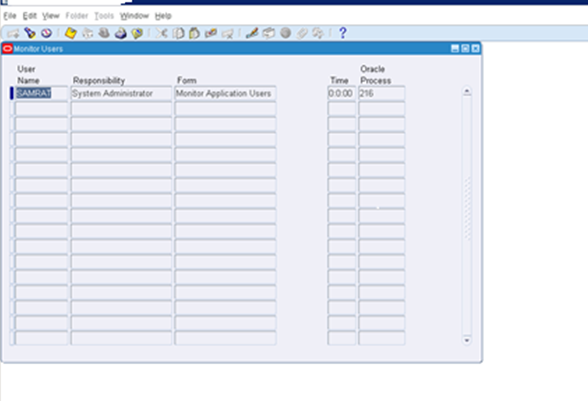
The online monitoring of
user activity within Oracle Applications is achieved via the Monitor Users form
(Form Name: FNDSCMON.fmx). The navigation path within the Sysadmin
responsibility is Security > User > Monitor. In order to activate the
capability of this form one has to select an appropriate option for the profile
option Sign-On: Audit Level Profile Option. The
available options are: -
NONE - No monitoring.
USER - Will only show you
a list of logged in users.
RESPONSIBILITY - Will
show you the user logged in and the responsibility they are using.
FORM - Will go down to
the lowest level of detail and show you the User, Responsibility and Form being
accessed.
The screen shot below
indicates what you would see if you had chosen the FORM option for the profile
option in question.
Log in with System
Administrator Responsibility
Navigate to Security:
Users > Monitor
Click (CTL + F11) keys to
display the result.

It is a good practice to set the Sign-On: Audit Level profile option to “Form” since it gives the most detailed information above other choices but it will impact the system performance since it collects a lot of information, so you have keep that in mind.
To inform users about unsuccessful logins to their account, you can set the “Sign-On: Notification” profile option to Yes. To do that from System Administrator Responsibility > Profile > System > Find the profile option “Sign-On: Notification” and change its value to Yes.


Enable Audit

This is a very useful
screen since it tells you exactly which users are logged in and what are they
doing in the system at any point in time. One may check this screen before
bouncing or restarting the system to make sure all users are logged out.
It is a good practice to set the Sign-On: Audit Level profile option to “Form” since it gives the most detailed information above other choices but it will impact the system performance since it collects a lot of information, so you have keep that in mind.
Viewing Monitoring Reports about Users and their activity:
Depending on what audit
level you have selected for the profile option under discussion you may also
generate various reports as indicated below: –
Sign-On Audit Concurrent Requests: View
information about who is requesting what concurrent requests and from which
responsibilities and forms.
Sign-On Audit Forms:View who is navigating to
what form and when they do it.
Sign-On Audit Responsibilities: Used to view who
is selecting what responsibility and when they are doing it.
Sign-On Audit Users:Used to view who signs
on and for how long.
Sign-On Audit Unsuccessful: Show audit
information about unsuccessful logins to Oracle Applications.
To view any of the given
reports monitoring user activity use following steps:
Navigate to System
Administrator Responsibility > Concurrent > Requests Or from the Menu Bar
go to View > Requests
Choose Submit New Request
> Single Request
Select report you want
from the 4 requests given above.
Click Submit > Find
Select report you choose
and click View output button to view the report.
Notifying Users of
Unsuccessful Logins to their accounts:
Sign-On Audit can track
user logins and provide users with a warning message if anyone has made an
unsuccessful attempt to sign on with their application username since their
last sign-on. This warning message appears after a user signs on. You do not
have to audit the user with Sign-On Audit to use this notification feature.
To inform users about unsuccessful logins to their account, you can set the “Sign-On: Notification” profile option to Yes. To do that from System Administrator Responsibility > Profile > System > Find the profile option “Sign-On: Notification” and change its value to Yes.
Page access tracking:
Page Access Tracking in
Oracle Applications Manager reports aggregate data for OAF- and JTF-based
applications, with Sign-on Audit data gathered for Forms-based applications.
Consequently, you can view usage flow paths that span all three technology
stacks.
Page Access Tracking
allows administrators to track application usage statistics and perform Web
site traffic analysis, aggregate data about user flows as well as drill down to
a particular user session.
Page Access Tracking
transparently captures application-rich context information for every user
click. In terms of performance, the data capture has negligible overhead.
Enable page tracking.
Go to OAM>Site
Map > Monitoring > Applications Usage
Reports > Page Access Tracking and Sign-on Audit Configuration>>Click
on Configurations

And then at the bottom, click
on apply. Next Migrating Page Access Tracking Data
Page Access Tracking data
is logged in the database in a staging area. It needs to be migrated and mined
before the UI reports are refreshed. How frequently Page AccessTracking Data
needs to be migrated and mined depends on how up-to-date the UI reports need to
be. Generally speaking, the recommendation is to run the concurrent program at least once a
day (for example at midnight) for the reports to be relatively up to date.
The "Page Access
Tracking Data Migration" can be scheduled either in Oracle Forms, or
within the OAM responsibility.
Schedule the concurrent
program "Page Access Tracking Data Migration" using Concurrent
Manager:
After the Concurrent
Program completes, you should be able to view the latest data reports and
statistic
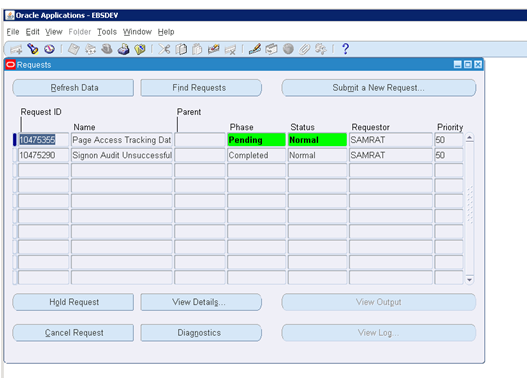
To view the output:

Click
on the respective pointers to know more about in details. For example, I
clicked on one of the pointers under Responsibility for 16th Jan
2017

We can also click on the respective pointers to drill down
further.
Debug Logging (Unexpected Logging)
The Oracle E-Business Suite Debug Log is used for a variety
of purposes. As the name suggests, it is often used to diagnosing and debugging
problems encountered in Oracle E-Business Suite code. This log can also assist
with diagnosing security problems and detecting security attacks. It can also
be leveraged for post-attack / forensic analysis.
The debug log is documented in the Oracle E-Business
Suite Maintenance Guide - Logging. The current recommendation in this
chapter is to set this to “UNEXPECTED”. This is important from a security
auditing perspective, since this is the level at which many of the security
errors are written out to the log.
The default configuration (and the current recommendation)
for Debug Logging is set to log information to the database. This makes it
easier to correlate and maintain logs in a multi-tier application environment.
The Debug Logging mechanism also supports logging to the
file system using the following profile:
|
AFLOG_FILENAME
|
FND: Debug Log Filename
|
"/path/to/apps.log"
|
Customers may want to consider enabling logging on the file
system, as there are some security benefits to maintaining the log on the file
system. File system logging will generally provide better protection against an
attacker being able to modify logging records via a SQL injection attack.
Example for collecting OAF Log files:
Enabling Audit in Database.
Setting up or enabling
the standard audit trail is quite easy and is outlined in the 2-Day+ Security
Guide as follows:
1. Start Database
Control
2. Log in as SYS
with SYSDBA privileges
3. Click
Server to display the Server subpage
4. Click
Initialization Parameters in the Database Configuration section
5. Click SPFile to
display the SPFile subpage. If you don’t use anSPFile just continue to the next
step
6. Enter
audit_trail in the Name field to find the AUDIT_TRAIL parameter and then click
Go
7. Enter
the type of auditing you want in the Value field where value can be:
DB – Enables Database
Auditing where records will primarily be written to the sys.aud$
OS – Enables auditing
records to be written to the operating system where you must also specify
AUDIT_FILE_DEST which tells Oracle where to write the audit record.
NONE – Will disable standard
auditing
DB, EXTENDED – does all
that the type of DB does, plus populating the SQL bind and SQL text CLOB-type
columns of the sys.aud$ table when available
XML – will write to the
operating system audit records in XML format
EXTENDED – will write to the
operating system audit records in XML format but also populates the SQL bind
and SQL text CLOB-types columns of the sys.aud$ table when available
8. Click
Apply
9. Restart the
Oracle instance
While setting up standard
auditing from the control panel is quite acceptable, this is one of the tasks
that can also easily be accomplished through the standard PL*SQL interface.
1. Log in as SYS
with SYSDBA privileges
Sqlplus / as sysdba
2. Check the
current settings
SQL> show parameter
audit
NAME TYPE VALUE
----------------------
----------- ------------------------------
audit_file_dest string /opt/app/oracle/admin/db11/adump
audit_sys_operationsboolean FALSE
audit_syslog_level string
audit_trail string DB
3. Set the type of
auditing you want by setting the audit_trail parameter
SQL> alter system set
audit_trail=OS scope=spfile;
System altered.
4. Set the auditing
destination
SQL> alter system set
audit_file_dest='/opt/app/oracle/admin/db11/adump' scope=spfile;
System altered.
5. Restart the
Oracle instance
SQL> SHUTDOWN
SQL> STARTUP
Also note that there are
two additional parameters audit_sys_operations and audit_syslog_level that you
should consider setting if you are concerned about the SYS account activity.
1.
audit_sys_operations - this initialization parameter tells Oracle to turn on
auditing of the SYS connections, and users connecting with the SYSDBA or
SYSOPER privilege. It has either a TRUE or FALSE value
2. audit_syslog_level
– this initialization parameter enables SYS and standard OS auditing records to
be written to the system using the SYSLOG utility
Now that we’ve enables
operating system auditing, it is always nice to see exactly what we’ve
accomplished. While this is not an exhaustive example, it does touch the
surface of what we are trying to accomplish here. Suppose now that we have an
un-authorized access attempt (failed login) to our database through the use of
the SCOTT/TIGER account.
- Advertisement -
1. we’ve locked this
account and any attempts will be now be met with ‘the account is locked’
message:
[oracle@ludwigadump]$
sqlplusscott/tiger
SQL*Plus: Release
11.1.0.6.0 - Production on Thu Dec 10 06:51:43 2009
Copyright (c) 1982, 2007,
Oracle. All rights reserved.
ERROR:
ORA-28000: the account is
locked
2. And now, because
of auditing, this attempt will not go unnoticed and will be reported in the
audit_file_dest location:
[oracle@ludwig ~]$ cd
$ORACLE_HOME/adump
[oracle@ludwigadump]$
more ora_3817.aud
Audit file
/opt/app/oracle/admin/db11/adump/ora_3817.aud
Oracle Database 11g
Enterprise Edition Release 11.1.0.6.0 - Production
With the Partitioning,
OLAP, Data Mining and Real Application Testing options
ORACLE_HOME =
/opt/app/oracle/product/11.1.0/db_1
System name: Linux
Node name: ludwig
Release: 2.6.18-8.el5
Version: #1 SMP Thu Mar 15 19:57:35 EDT 2007
Machine: i686
Instance name: db11
Redo thread mounted by
this instance: 1
Oracle process number: 18
Unix process pid: 3817,
image: oracle@ludwig (TNS V1-V3)
Thu Dec 10 06:48:46 2009
SESSIONID:
"280057" ENTRYID: "1" STATEMENT: "1" USERID:
"SCOTT" USERHOST: "ludwig" TERMINAL: "pts/1"
ACTION: "100"
RETURNCODE:
"28000" COMMENT$TEXT: "Authenticated by: DATABASE"
OS$USERID: "oracle"
Now that you have the
settings changed, you can start monitoring the activity on the SYS account.
Remember standard auditing can monitor and record various user database actions
such as SQL statements, privileges, schemas, objects, and network and multitier
activity. Now is the time to dig in, see how far standard auditing can take you
to gain compliancy and then fill in the gaps. The issue becomes whether you can
provide auditors everything they need to pass your audit. If you can monitor
all database traffic and take appropriate action then you will pass, otherwise
you are in for a lot of work. But more on that latter.
Database Audit and Audit trail purging
DBMS_AUDIT_MGMT.
There are several
reason to enable database audit and at least as much reason to not enable
database audit.
Enable Audit
Ok, first of all we
have to set the corresponding init.ora parameter and enable the database audit.
In my case I’ll also enable audit of all sys operation. This is not necessary
when you plan to use standard audit. I just did it because I restarted the
database anyway. ok lame excuse, I will come back again later on.
Set the init.ora
parameter:
ALTER system SET audit_sys_operations=TRUE scope=spfile;
ALTER system SET audit_trail=db_extended scope=spfile;
startup force;
SHOW parameter audit
ALTER system SET audit_trail=db_extended scope=spfile;
startup force;
SHOW parameter audit
Initialize the audit
infrastructure. In this example I’ve initialized the standard audit and set a
default interval of 10 days.
BEGIN
DBMS_AUDIT_MGMT.INIT_CLEANUP(
AUDIT_TRAIL_TYPE => DBMS_AUDIT_MGMT.AUDIT_TRAIL_AUD_STD,
DEFAULT_CLEANUP_INTERVAL => 240 /*hours*/
);
END;
/
commit;
DBMS_AUDIT_MGMT.INIT_CLEANUP(
AUDIT_TRAIL_TYPE => DBMS_AUDIT_MGMT.AUDIT_TRAIL_AUD_STD,
DEFAULT_CLEANUP_INTERVAL => 240 /*hours*/
);
END;
/
commit;
Create a dedicated
tablespace for the audit data and change the location of the audit trail. If
this is not done AUD$ will remain in the SYSAUX tablespace.
CREATE tablespaceaudit_datadatafile '/u01/oradata/TDB03/audit01TDB03.dbf'
SIZE 100M autoextend ON NEXT 50M maxsize 5G;
BEGIN
DBMS_AUDIT_MGMT.SET_AUDIT_TRAIL_LOCATION(
AUDIT_TRAIL_TYPE => DBMS_AUDIT_MGMT.AUDIT_TRAIL_AUD_STD,
AUDIT_TRAIL_LOCATION_VALUE => 'AUDIT_DATA'
);
END;
/
commit;
SIZE 100M autoextend ON NEXT 50M maxsize 5G;
BEGIN
DBMS_AUDIT_MGMT.SET_AUDIT_TRAIL_LOCATION(
AUDIT_TRAIL_TYPE => DBMS_AUDIT_MGMT.AUDIT_TRAIL_AUD_STD,
AUDIT_TRAIL_LOCATION_VALUE => 'AUDIT_DATA'
);
END;
/
commit;
Review the audit
settings
col
PARAMETER_NAME FOR a30
col PARAMETER_VALUE FOR a15
col AUDIT_TRAIL FOR a20
SELECT PARAMETER_NAME, PARAMETER_VALUE, AUDIT_TRAIL
FROM DBA_AUDIT_MGMT_CONFIG_PARAMS
WHERE audit_trail = 'STANDARD AUDIT TRAIL';
PARAMETER_NAME PARAMETER_VALUE AUDIT_TRAIL
------------------------------ --------------- --------------------
DEFAULT CLEAN UP INTERVAL 12 STANDARD AUDIT TRAIL
DB AUDIT TABLESPACE AUDIT_DATA STANDARD AUDIT TRAIL
DB AUDIT CLEAN BATCH SIZE 10000 STANDARD AUDIT TRAIL
col segment_name FOR a10
SELECT owner,segment_name,tablespace_name FROM dba_segments WHERE segment_name ='AUD$';
OWNER SEGMENT_NA TABLESPACE_NAME
------------------------------ ---------- ------------------------------
SYS AUD$ AUDIT_DATA
col PARAMETER_VALUE FOR a15
col AUDIT_TRAIL FOR a20
SELECT PARAMETER_NAME, PARAMETER_VALUE, AUDIT_TRAIL
FROM DBA_AUDIT_MGMT_CONFIG_PARAMS
WHERE audit_trail = 'STANDARD AUDIT TRAIL';
PARAMETER_NAME PARAMETER_VALUE AUDIT_TRAIL
------------------------------ --------------- --------------------
DEFAULT CLEAN UP INTERVAL 12 STANDARD AUDIT TRAIL
DB AUDIT TABLESPACE AUDIT_DATA STANDARD AUDIT TRAIL
DB AUDIT CLEAN BATCH SIZE 10000 STANDARD AUDIT TRAIL
col segment_name FOR a10
SELECT owner,segment_name,tablespace_name FROM dba_segments WHERE segment_name ='AUD$';
OWNER SEGMENT_NA TABLESPACE_NAME
------------------------------ ---------- ------------------------------
SYS AUD$ AUDIT_DATA
Ok, the audit
infrastructure has been setup and configured. Now lets enable audit for certain
system privilege and objects. The first part of the following audit statements
have been taken from $ORACLE_HOME/rdbms/admin/secconf.sql. This
script is used in 11g to enable audit during database creation.
audit ALTER any TABLE BY access;
audit CREATE any TABLE BY access;
audit DROP any TABLE BY access;
audit CREATE any PROCEDURE BY access;
audit DROP any PROCEDURE BY access;
audit ALTER any PROCEDURE BY access;
audit GRANT any privilege BY access;
audit GRANT any object privilege BY access;
audit GRANT any ROLE BY access;
audit audit system BY access;
audit CREATE external job BY access;
audit CREATE any job BY access;
audit CREATE any library BY access;
audit CREATE public DATABASE link BY access;
audit exempt access policy BY access;
audit ALTER USER BY access;
audit CREATE USER BY access;
audit ROLE BY access;
audit CREATE SESSION BY access;
audit DROP USER BY access;
audit ALTER DATABASE BY access;
audit ALTER system BY access;
audit ALTER profile BY access;
audit DROP profile BY access;
audit DATABASE link BY access;
audit system audit BY access;
audit profile BY access;
audit public synonym BY access;
audit system GRANT BY access;
audit DELETE ON sys.aud$;
audit ALTER ON DEFAULT;
audit GRANT ON DEFAULT;
audit CREATE any TABLE BY access;
audit DROP any TABLE BY access;
audit CREATE any PROCEDURE BY access;
audit DROP any PROCEDURE BY access;
audit ALTER any PROCEDURE BY access;
audit GRANT any privilege BY access;
audit GRANT any object privilege BY access;
audit GRANT any ROLE BY access;
audit audit system BY access;
audit CREATE external job BY access;
audit CREATE any job BY access;
audit CREATE any library BY access;
audit CREATE public DATABASE link BY access;
audit exempt access policy BY access;
audit ALTER USER BY access;
audit CREATE USER BY access;
audit ROLE BY access;
audit CREATE SESSION BY access;
audit DROP USER BY access;
audit ALTER DATABASE BY access;
audit ALTER system BY access;
audit ALTER profile BY access;
audit DROP profile BY access;
audit DATABASE link BY access;
audit system audit BY access;
audit profile BY access;
audit public synonym BY access;
audit system GRANT BY access;
audit DELETE ON sys.aud$;
audit ALTER ON DEFAULT;
audit GRANT ON DEFAULT;
There are a few data
dictionary views to review which object and system privilege has audit enabled.
SELECT * FROM DBA_STMT_AUDIT_OPTS;
USER_NAME PROXY_NAME AUDIT_OPTION SUCCESS FAILURE
---------- ---------- ---------------------------- ---------- ----------
ALTER SYSTEM BY ACCESS BY ACCESS
SYSTEM AUDIT BY ACCESS BY ACCESS
CREATE SESSION BY ACCESS BY ACCESS
CREATE USER BY ACCESS BY ACCESS
ALTER USER BY ACCESS BY ACCESS
DROP USER BY ACCESS BY ACCESS
PUBLIC SYNONYM BY ACCESS BY ACCESS
DATABASE LINK BY ACCESS BY ACCESS
ROLE BY ACCESS BY ACCESS
PROFILE BY ACCESS BY ACCESS
CREATE ANY TABLE BY ACCESS BY ACCESS
ALTER ANY TABLE BY ACCESS BY ACCESS
DROP ANY TABLE BY ACCESS BY ACCESS
GRANT TABLE BY ACCESS BY ACCESS
CREATE PUBLIC DATABASE LINK BY ACCESS BY ACCESS
GRANT ANY ROLE BY ACCESS BY ACCESS
SYSTEM GRANT BY ACCESS BY ACCESS
ALTER DATABASE BY ACCESS BY ACCESS
CREATE ANY PROCEDURE BY ACCESS BY ACCESS
ALTER ANY PROCEDURE BY ACCESS BY ACCESS
DROP ANY PROCEDURE BY ACCESS BY ACCESS
ALTER PROFILE BY ACCESS BY ACCESS
DROP PROFILE BY ACCESS BY ACCESS
GRANT ANY PRIVILEGE BY ACCESS BY ACCESS
CREATE ANY LIBRARY BY ACCESS BY ACCESS
EXEMPT ACCESS POLICY BY ACCESS BY ACCESS
GRANT ANY OBJECT PRIVILEGE BY ACCESS BY ACCESS
CREATE ANY JOB BY ACCESS BY ACCESS
CREATE EXTERNAL JOB BY ACCESS BY ACCESS
SELECT * FROM DBA_PRIV_AUDIT_OPTS;
USER_NAME PROXY_NAME PRIVILEGE SUCCESS FAILURE
---------- ---------- ---------------------------- ---------- ----------
CREATE EXTERNAL JOB BY ACCESS BY ACCESS
CREATE ANY JOB BY ACCESS BY ACCESS
GRANT ANY OBJECT PRIVILEGE BY ACCESS BY ACCESS
EXEMPT ACCESS POLICY BY ACCESS BY ACCESS
CREATE ANY LIBRARY BY ACCESS BY ACCESS
GRANT ANY PRIVILEGE BY ACCESS BY ACCESS
DROP PROFILE BY ACCESS BY ACCESS
ALTER PROFILE BY ACCESS BY ACCESS
DROP ANY PROCEDURE BY ACCESS BY ACCESS
ALTER ANY PROCEDURE BY ACCESS BY ACCESS
CREATE ANY PROCEDURE BY ACCESS BY ACCESS
ALTER DATABASE BY ACCESS BY ACCESS
GRANT ANY ROLE BY ACCESS BY ACCESS
CREATE PUBLIC DATABASE LINK BY ACCESS BY ACCESS
DROP ANY TABLE BY ACCESS BY ACCESS
ALTER ANY TABLE BY ACCESS BY ACCESS
CREATE ANY TABLE BY ACCESS BY ACCESS
DROP USER BY ACCESS BY ACCESS
ALTER USER BY ACCESS BY ACCESS
CREATE USER BY ACCESS BY ACCESS
CREATE SESSION BY ACCESS BY ACCESS
AUDIT SYSTEM BY ACCESS BY ACCESS
ALTER SYSTEM BY ACCESS BY ACCESS
SELECT * FROM DBA_OBJ_AUDIT_OPTS;
OWNER OBJECT_NAME OBJECT_TYPE ALT AUD COM DEL GRA IND INS LOC REN SEL UPD REF EXE CRE REA WRI FBK
----- -------------------- ----------- --- --- --- --- --- --- --- --- --- --- --- --- --- --- --- --- ---
SYS AUD$ TABLE -/- -/- -/- S/S -/- -/- -/- -/- -/- -/- -/- -/- -/- -/- -/- -/- -/-
SYS VERIFY_FUNCTION PROCEDURE -/- -/- -/- -/- S/S -/- -/- -/- -/- -/- -/- -/- -/- -/- -/- -/- -/-
SYS VERIFY_FUNCTION_11G PROCEDURE -/- -/- -/- -/- S/S -/- -/- -/- -/- -/- -/- -/- -/- -/- -/- -/- -/-
SELECT * FROM ALL_DEF_AUDIT_OPTS;
ALT AUD COM DEL GRA IND INS LOC REN SEL UPD REF EXE FBK REA
--- --- --- --- --- --- --- --- --- --- --- --- --- --- ---
S/S -/- -/- -/- S/S -/- -/- -/- -/- -/- -/- -/- -/- -/- -/-
USER_NAME PROXY_NAME AUDIT_OPTION SUCCESS FAILURE
---------- ---------- ---------------------------- ---------- ----------
ALTER SYSTEM BY ACCESS BY ACCESS
SYSTEM AUDIT BY ACCESS BY ACCESS
CREATE SESSION BY ACCESS BY ACCESS
CREATE USER BY ACCESS BY ACCESS
ALTER USER BY ACCESS BY ACCESS
DROP USER BY ACCESS BY ACCESS
PUBLIC SYNONYM BY ACCESS BY ACCESS
DATABASE LINK BY ACCESS BY ACCESS
ROLE BY ACCESS BY ACCESS
PROFILE BY ACCESS BY ACCESS
CREATE ANY TABLE BY ACCESS BY ACCESS
ALTER ANY TABLE BY ACCESS BY ACCESS
DROP ANY TABLE BY ACCESS BY ACCESS
GRANT TABLE BY ACCESS BY ACCESS
CREATE PUBLIC DATABASE LINK BY ACCESS BY ACCESS
GRANT ANY ROLE BY ACCESS BY ACCESS
SYSTEM GRANT BY ACCESS BY ACCESS
ALTER DATABASE BY ACCESS BY ACCESS
CREATE ANY PROCEDURE BY ACCESS BY ACCESS
ALTER ANY PROCEDURE BY ACCESS BY ACCESS
DROP ANY PROCEDURE BY ACCESS BY ACCESS
ALTER PROFILE BY ACCESS BY ACCESS
DROP PROFILE BY ACCESS BY ACCESS
GRANT ANY PRIVILEGE BY ACCESS BY ACCESS
CREATE ANY LIBRARY BY ACCESS BY ACCESS
EXEMPT ACCESS POLICY BY ACCESS BY ACCESS
GRANT ANY OBJECT PRIVILEGE BY ACCESS BY ACCESS
CREATE ANY JOB BY ACCESS BY ACCESS
CREATE EXTERNAL JOB BY ACCESS BY ACCESS
SELECT * FROM DBA_PRIV_AUDIT_OPTS;
USER_NAME PROXY_NAME PRIVILEGE SUCCESS FAILURE
---------- ---------- ---------------------------- ---------- ----------
CREATE EXTERNAL JOB BY ACCESS BY ACCESS
CREATE ANY JOB BY ACCESS BY ACCESS
GRANT ANY OBJECT PRIVILEGE BY ACCESS BY ACCESS
EXEMPT ACCESS POLICY BY ACCESS BY ACCESS
CREATE ANY LIBRARY BY ACCESS BY ACCESS
GRANT ANY PRIVILEGE BY ACCESS BY ACCESS
DROP PROFILE BY ACCESS BY ACCESS
ALTER PROFILE BY ACCESS BY ACCESS
DROP ANY PROCEDURE BY ACCESS BY ACCESS
ALTER ANY PROCEDURE BY ACCESS BY ACCESS
CREATE ANY PROCEDURE BY ACCESS BY ACCESS
ALTER DATABASE BY ACCESS BY ACCESS
GRANT ANY ROLE BY ACCESS BY ACCESS
CREATE PUBLIC DATABASE LINK BY ACCESS BY ACCESS
DROP ANY TABLE BY ACCESS BY ACCESS
ALTER ANY TABLE BY ACCESS BY ACCESS
CREATE ANY TABLE BY ACCESS BY ACCESS
DROP USER BY ACCESS BY ACCESS
ALTER USER BY ACCESS BY ACCESS
CREATE USER BY ACCESS BY ACCESS
CREATE SESSION BY ACCESS BY ACCESS
AUDIT SYSTEM BY ACCESS BY ACCESS
ALTER SYSTEM BY ACCESS BY ACCESS
SELECT * FROM DBA_OBJ_AUDIT_OPTS;
OWNER OBJECT_NAME OBJECT_TYPE ALT AUD COM DEL GRA IND INS LOC REN SEL UPD REF EXE CRE REA WRI FBK
----- -------------------- ----------- --- --- --- --- --- --- --- --- --- --- --- --- --- --- --- --- ---
SYS AUD$ TABLE -/- -/- -/- S/S -/- -/- -/- -/- -/- -/- -/- -/- -/- -/- -/- -/- -/-
SYS VERIFY_FUNCTION PROCEDURE -/- -/- -/- -/- S/S -/- -/- -/- -/- -/- -/- -/- -/- -/- -/- -/- -/-
SYS VERIFY_FUNCTION_11G PROCEDURE -/- -/- -/- -/- S/S -/- -/- -/- -/- -/- -/- -/- -/- -/- -/- -/- -/-
SELECT * FROM ALL_DEF_AUDIT_OPTS;
ALT AUD COM DEL GRA IND INS LOC REN SEL UPD REF EXE FBK REA
--- --- --- --- --- --- --- --- --- --- --- --- --- --- ---
S/S -/- -/- -/- S/S -/- -/- -/- -/- -/- -/- -/- -/- -/- -/-
Audit trail
housekeeping
So far we’ve spend
quite some time on setting up the audit. Let’s come to the actual part of the
post, the housekeeping. The plan is to have regular database job, which purge
the audit data as required. For this I defined the following steps:
Create a report of your
audit trail (optional)
Export your audit trail
information for longterm archiving (optional)
Set the archive timestamp
as soon as audit data has been archived
Purge archived audit
data
I the current example
I’ll skip the first to steps.
Create daily archive
timestamp job. This job will be a regular dbms_scheduler job.
BEGIN
DBMS_SCHEDULER.CREATE_JOB (
job_name => 'DAILY_AUDIT_ARCHIVE_TIMESTAMP',
job_type => 'PLSQL_BLOCK',
job_action => 'BEGIN DBMS_AUDIT_MGMT.SET_LAST_ARCHIVE_TIMESTAMP(AUDIT_TRAIL_TYPE =>
DBMS_AUDIT_MGMT.AUDIT_TRAIL_AUD_STD,LAST_ARCHIVE_TIME => sysdate-10); END;',
start_date => sysdate,
repeat_interval => 'FREQ=HOURLY;INTERVAL=24',
enabled => TRUE,
comments => 'Create an archive timestamp'
);
END;
/
DBMS_SCHEDULER.CREATE_JOB (
job_name => 'DAILY_AUDIT_ARCHIVE_TIMESTAMP',
job_type => 'PLSQL_BLOCK',
job_action => 'BEGIN DBMS_AUDIT_MGMT.SET_LAST_ARCHIVE_TIMESTAMP(AUDIT_TRAIL_TYPE =>
DBMS_AUDIT_MGMT.AUDIT_TRAIL_AUD_STD,LAST_ARCHIVE_TIME => sysdate-10); END;',
start_date => sysdate,
repeat_interval => 'FREQ=HOURLY;INTERVAL=24',
enabled => TRUE,
comments => 'Create an archive timestamp'
);
END;
/
Create daily purge job
BEGIN
DBMS_AUDIT_MGMT.CREATE_PURGE_JOB(
AUDIT_TRAIL_TYPE => DBMS_AUDIT_MGMT.AUDIT_TRAIL_AUD_STD,
AUDIT_TRAIL_PURGE_INTERVAL => 24 /* hours */,
AUDIT_TRAIL_PURGE_NAME => 'Daily_Audit_Purge_Job',
USE_LAST_ARCH_TIMESTAMP => TRUE
);
END;
/
commit;
DBMS_AUDIT_MGMT.CREATE_PURGE_JOB(
AUDIT_TRAIL_TYPE => DBMS_AUDIT_MGMT.AUDIT_TRAIL_AUD_STD,
AUDIT_TRAIL_PURGE_INTERVAL => 24 /* hours */,
AUDIT_TRAIL_PURGE_NAME => 'Daily_Audit_Purge_Job',
USE_LAST_ARCH_TIMESTAMP => TRUE
);
END;
/
commit;
The defined AUDIT JOB’s
are then visible in DBA_AUDIT_MGMT_CLEANUP_JOBS.
col
JOB_NAME FOR a30
col JOB_FREQUENCY FOR a40
SELECT JOB_NAME,JOB_STATUS,AUDIT_TRAIL,JOB_FREQUENCY FROM DBA_AUDIT_MGMT_CLEANUP_JOBS;
JOB_NAME JOB_STAT AUDIT_TRAIL JOB_FREQUENCY
---------------------- -------- -------------------- ------------------------
DAILY_AUDIT_PURGE_JOB ENABLED STANDARD AUDIT TRAIL FREQ=HOURLY;INTERVAL=24
col JOB_FREQUENCY FOR a40
SELECT JOB_NAME,JOB_STATUS,AUDIT_TRAIL,JOB_FREQUENCY FROM DBA_AUDIT_MGMT_CLEANUP_JOBS;
JOB_NAME JOB_STAT AUDIT_TRAIL JOB_FREQUENCY
---------------------- -------- -------------------- ------------------------
DAILY_AUDIT_PURGE_JOB ENABLED STANDARD AUDIT TRAIL FREQ=HOURLY;INTERVAL=24
As we can see in dba_scheduler_jobs, DBMS_SCHEDULER.CREATE_JOB is
just creating a other scheduler job.
col
next_run_date FOR a50
SELECT job_name, next_run_date, state, enabled FROM dba_scheduler_jobs WHERE job_name LIKE '%AUDIT%';
JOB_NAME NEXT_RUN_DATE STATE ENABL
------------------------------ -------------------------------------------------- --------------- -----
DAILY_AUDIT_ARCHIVE_TIMESTAMP 31-MAY-11 01.46.58.000000 PM +02:00 SCHEDULED TRUE
DAILY_AUDIT_PURGE_JOB 31-MAY-11 01.49.34.900000 PM EUROPE/VIENNA SCHEDULED TRUE
SELECT job_name, next_run_date, state, enabled FROM dba_scheduler_jobs WHERE job_name LIKE '%AUDIT%';
JOB_NAME NEXT_RUN_DATE STATE ENABL
------------------------------ -------------------------------------------------- --------------- -----
DAILY_AUDIT_ARCHIVE_TIMESTAMP 31-MAY-11 01.46.58.000000 PM +02:00 SCHEDULED TRUE
DAILY_AUDIT_PURGE_JOB 31-MAY-11 01.49.34.900000 PM EUROPE/VIENNA SCHEDULED TRUE